
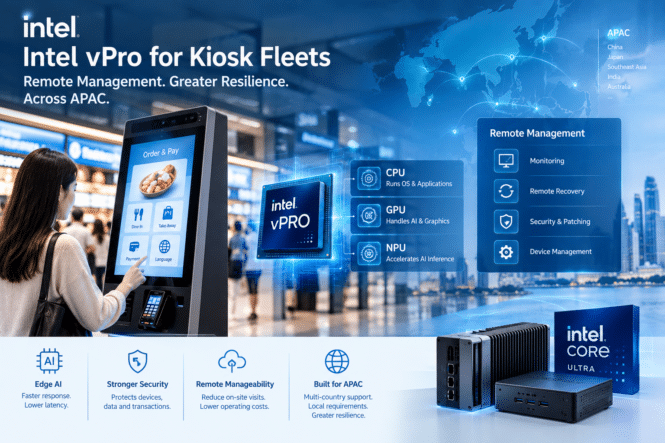
For a kiosk fleet with hundreds or thousands of unattended devices, hardware reliability is only part of the operational challenge. The bigger question is what happens when a kiosk stops responding at a retail store, restaurant, airport, transit station, or franchise location hundreds of kilometers away.
In APAC, this challenge can become even more complex. Fleets may span multiple countries, network environments, languages, service partners, and regulatory requirements. Sending a technician every time a kiosk crashes is rarely a scalable operating model.
This is where remote manageability becomes part of the kiosk architecture—not simply an IT convenience.
1. Why Kiosk Fleet Management Is Different
A conventional office PC usually has a user sitting nearby who can report a problem or restart the system. A self-service kiosk may have no one responsible for it locally.
A failed kiosk can therefore mean:
- A self-ordering terminal stops accepting orders
- A ticketing kiosk becomes unavailable
- A digital menu or payment terminal freezes
- A camera-based system stops processing correctly
- An application update leaves the device unable to start
For a fleet distributed across shopping malls, QSR locations, transportation hubs, hotels, and other public environments, the operational problem is not just fixing one computer. It is maintaining availability across an entire fleet.
The larger the deployment, the more important it becomes to reduce unnecessary site visits.
2. What Happens When a Kiosk Goes Offline?
Consider a simple scenario.
A self-ordering kiosk receives a software update overnight. The application fails to launch after reboot. The store employee can see a blank screen, but there may be no technical staff on site.
With conventional support, the process might look like this:
Kiosk offline → remote diagnosis attempt → technician dispatched → physical reboot → application recovery → technician leaves
For a large fleet, repeating this process hundreds of times can quickly become expensive.
Remote management changes the workflow:
Kiosk offline → fleet platform detects issue → remote diagnosis → reboot/recovery → technician only if necessary
Intel AMT is designed specifically for this type of hardware-level, out-of-band management. Intel describes AMT as capable of remote management independently of the host operating system, including power management and other recovery functions.
This distinction becomes particularly useful when the operating system itself is the problem.
3. Remote Manageability Is More Than One Software Tool
A common mistake is to treat “remote management” as a single product.
A practical kiosk architecture usually has three different layers.
Layer 1: Kiosk Fleet Management Software
This is the application-level control layer.
It can typically provide:
- Device inventory
- Application deployment
- Content management
- Health monitoring
- Remote configuration
- Alerts and reporting
For example, an operator may use a fleet platform to determine whether the kiosk application is running and whether the device has recently checked in.
Layer 2: OS and Endpoint Management
The second layer handles the operating system and endpoint configuration.
Typical responsibilities include:
- OS updates
- Driver management
- Security patches
- Application configuration
- User and access policies
- Endpoint security
This layer is essential for maintaining a consistent software environment across hundreds or thousands of endpoints.
Layer 3: Hardware-Level Management
This is where Intel vPro and Intel Active Management Technology (AMT) can add another capability.
Intel AMT provides out-of-band management that operates independently of the operating system. Depending on the platform and configuration, administrators can perform functions such as remote power control and KVM-based management.
The value is straightforward:
The fleet platform manages the kiosk.
The OS management layer manages the software environment.
vPro/AMT provides a hardware-level recovery path when the normal software path fails.
4. Where Intel vPro Fits
Intel vPro should therefore not be viewed as a replacement for kiosk fleet-management software.
Instead, it can complement the existing management stack.
Imagine a kiosk where Windows has become unresponsive after a driver failure. A conventional remote-management agent running inside the OS may no longer respond.
With an appropriately configured Intel vPro Enterprise platform, AMT can provide an out-of-band management path that remains available even when the OS is unavailable. Intel states that AMT can support remote management when the host OS is not functioning, provided the required platform and network conditions are available.
For a kiosk operator, this can turn a potential truck roll into a remote recovery event.
However, this does not mean every kiosk needs vPro.
5. What Intel vPro Does Not Replace
This distinction is important when calculating the real value of vPro.
Intel vPro does not automatically replace:
- Kiosk fleet-management software
- Mobile device or endpoint management platforms
- Network monitoring
- Cellular or Wi-Fi connectivity
- Application monitoring
- Payment-security systems
- Cloud infrastructure
- Physical maintenance
- A local technician when the hardware itself has failed
It also cannot magically manage a kiosk that has completely lost power or network connectivity. Intel notes that AMT requires a network connection for remote management, and wireless configurations have specific provisioning requirements.
For this reason, remote manageability should be designed as part of the complete kiosk infrastructure, rather than added as an isolated hardware feature.
6. Security Matters for Distributed Kiosk Fleets
Kiosks increasingly handle sensitive workloads, including payment transactions, cameras, microphones, customer information, and AI inference.
Security therefore needs to extend below the application layer.
Intel vPro includes hardware- and firmware-level security capabilities such as hardware-based boot integrity, Secure Boot-related protections, and below-the-OS security mechanisms.
For fleet operators, the practical objective is not simply “more security features.” It is maintaining a consistent security posture across devices that may be deployed in locations where IT staff rarely visit.
A mature deployment should combine:
Secure hardware → hardened OS → endpoint security → controlled administrator access → patch management → continuous monitoring
Remote access itself must also be tightly governed. Administrator authentication, role-based access, audit logs, network segmentation, and appropriate provisioning should be considered before enabling remote management at scale.
7. Why APAC Deployment Changes the Equation
APAC is not one uniform deployment environment.
A kiosk fleet may include high-density urban locations in Singapore, Japan, South Korea, or major Chinese cities, while another deployment may cover dispersed locations across Indonesia, the Philippines, Thailand, India, or Australia.
The operational conditions can be very different.
Multi-country fleets
Different countries may involve different:
- Network providers
- Service partners
- Operating environments
- Languages
- Security requirements
- Hardware configurations
A centralized management architecture can reduce the amount of country-specific intervention required for routine maintenance.
Limited on-site IT support
A kiosk inside a major city shopping mall may be relatively easy to reach.
A kiosk located in a remote transportation facility, franchise outlet, highway service area, or geographically dispersed retail network may require significant travel time.
The further a kiosk is from technical support, the more valuable remote diagnosis and recovery can become.
Connectivity differences
Remote management is only as useful as the network path behind it.
Before deployment, operators should evaluate whether kiosks use Ethernet, Wi-Fi, private networks, or cellular connectivity—and what happens when the primary connection fails.
This is especially important for AMT because hardware-level remote access still depends on the required network and power conditions.
Downtime has a different cost at scale
Suppose one kiosk requires a technician visit every few months.
That may not matter for a five-device deployment.
For 500 or 2,000 kiosks, however, even a relatively small failure rate can create a recurring field-service workload.
The correct calculation is therefore not simply:
“How much more does vPro hardware cost?”
It should be:
Hardware premium + management infrastructure + support costs vs. avoided technician visits + reduced downtime + longer operational lifecycle.
8. When Is Intel vPro Worth It—and When Is It Not?
vPro may make sense when:
- The fleet contains hundreds or thousands of kiosks
- Devices are geographically distributed
- Site access is expensive or difficult
- Downtime directly affects revenue
- Kiosks are expected to operate for many years
- Security and hardware-level control are important
- The organization already has centralized IT operations
For these deployments, the value of remote recovery can outweigh the additional platform cost.
vPro may be less necessary when:
- Only a small number of kiosks are deployed
- Devices are located in easily accessible stores
- Replacement is cheaper than diagnosis
- Hardware has a short lifecycle
- Existing management tools already provide sufficient recovery capability
- Downtime has limited business impact
The goal should not be to maximize hardware features. It should be to minimize the total cost and operational risk of running the fleet.
9. APAC Kiosk Fleet Buyer’s Checklist
Before selecting a remotely manageable kiosk platform, buyers should ask:
Fleet
- How many kiosks will be deployed?
- How geographically distributed are they?
Recovery
- Can the device be remotely rebooted?
- What happens if the OS fails?
- Is hardware-level recovery required?
Management
- What does the fleet-management platform already provide?
- How will it integrate with OS management?
- Can hardware-level management be accessed through existing IT workflows?
Security
- How are administrators authenticated?
- How are firmware and OS updates controlled?
- Can access and recovery actions be audited?
Connectivity
- Is Ethernet, Wi-Fi, or cellular connectivity available?
- What happens during network outages?
- Does the chosen hardware support the required remote-management configuration?
Lifecycle
- How long will the kiosks remain deployed?
- What is the expected failure rate?
- How much does an on-site technician visit cost?
TCO
- What is the cost of the hardware?
- What is the cost of management software?
- What is the cost of field service?
- How much revenue or customer experience is lost during downtime?
Conclusion: Remote Manageability Is an Architecture Decision
For kiosk fleets, remote manageability should not be evaluated as a simple processor feature.
The more useful question is:
What happens when a kiosk fails—and how much of that recovery can be completed without sending someone to the site?
Intel vPro and AMT can provide a hardware-level management layer that complements kiosk fleet software and OS management, particularly for large, geographically distributed deployments.
But vPro is not automatically the right answer for every kiosk. Small, easily accessible, low-cost deployments may achieve a better TCO with simpler hardware and software-based management.
For APAC operators, the strongest architecture is therefore not necessarily the one with the most features. It is the one that combines fleet management, endpoint security, reliable connectivity, remote recovery, and appropriate hardware around the actual operating environment.


