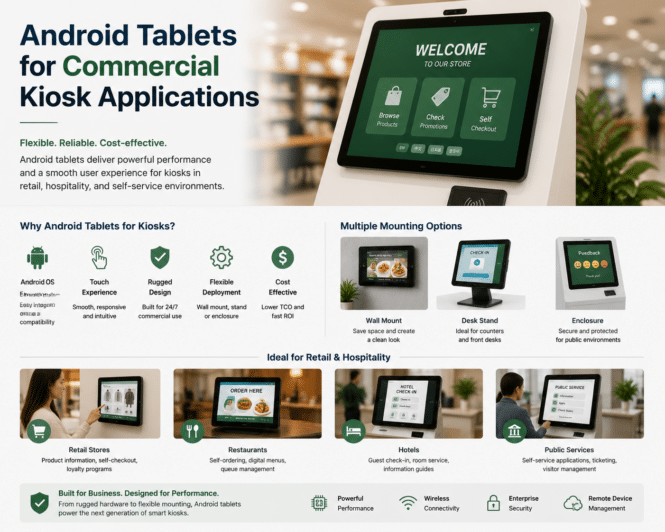
An Android tablet is not automatically a commercial kiosk platform. It may be appropriate for light-duty visitor check-in, staff-facing applications, meeting-room control, product lookup, or temporary deployments. But unattended public kiosks, self-order stations, payment systems, outdoor environments, and 24/7 deployments often require purpose-built tablet hardware or a kiosk PC/industrial Android device with documented thermal design, power management, remote support, long-term OS maintenance, and peripheral integration.
A sophisticated buyer needs answers to questions such as:
Is the tablet consumer-grade, ruggedized, or genuinely commercial/industrial?
What Android version ships with it, and for how long will it receive security patches?
Does it have Google Mobile Services, Android Enterprise compatibility, or an AOSP-based operating system?
Can it run in portrait orientation 16–24 hours a day without battery swelling, thermal throttling, display retention, or charging failure?
Can the battery be removed, bypassed, or managed safely in a permanently powered kiosk?
Does it support Ethernet, Power over Ethernet, USB peripherals, serial adapters, NFC, payment terminals, barcode scanners, printers, cameras, and receipt printers?
Can it be locked down using an MDM/EMM platform or kiosk-mode software?
Is there a documented product lifecycle, spare-parts program, warranty, repair process, and end-of-life notice?
Is the device appropriate for payment, healthcare, government, outdoor, or accessibility-sensitive deployments?
Self-service technology is moving beyond the traditional touchscreen. In retail, hospitality, transportation, and food service, speech recognition and conversational AI and touchless interfaces are becoming important components of the next generation of kiosks.
The shift is not simply about removing physical contact. It is about creating faster, more flexible, and more accessible interactions between customers and automated systems.
From Touchscreens to Multimodal Interaction
For years, most self-service kiosks followed the same model: a display, touchscreen, payment system, and backend software.
That model remains effective, but AI is introducing new interaction methods.
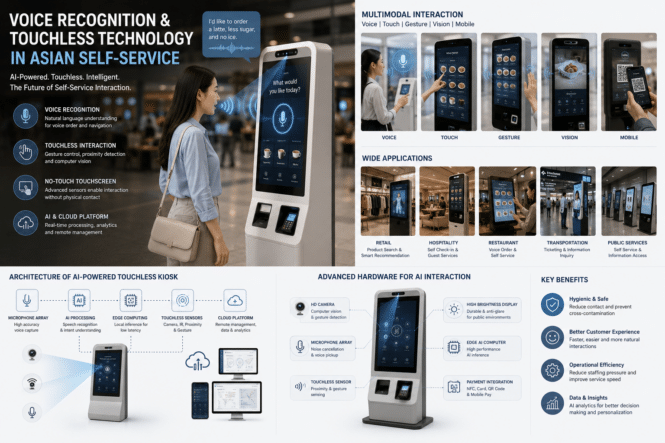
Modern systems can combine:
Voice recognition
Touch interaction
Gesture control
Computer vision
QR and mobile interaction
AI-powered conversational interfaces
This creates a multimodal self-service system, allowing users to choose the interaction method that best fits the situation.
Recent deployments in Asia are already demonstrating voice-driven ordering and multilingual AI kiosk concepts, particularly in QSR and public-service environments.
What’s the difference between a demo-capable interface and a scalable self-service deployment.
A system that recognizes a coffee order in a quiet lab may fail in a food court because of music, fryer noise, queues, children, accents, multilingual code-switching, menu-specific terms, poor microphone placement, or two customers speaking nearby. The appropriate KPI is not simply speech-to-text accuracy. It is the end-to-end completion rate: correct order, correct modifiers, no staff intervention, acceptable elapsed time, no abandoned session, and no payment/order mismatch.
Accessibility and privacy
Voice is an additional channel, not an accessible replacement for touch. Same for gesture.
A voice-only interaction excludes people who cannot or prefer not to speak; audio-only output excludes deaf and hard-of-hearing users; and public voice interaction can be inappropriate for private tasks.
Accessible kiosks should provide independent alternatives across input and output: visual content, speech output, physical/tactile or other non-voice input, adjustable timing, and private listening where audio is used. The U.S. Access Board’s ICT requirements include private-listening capability for speech output and user-adjustable amplification/volume provisions in noisy public areas.access-board
W3C guidance similarly emphasizes that speech interaction needs well-labelled, controllable UI elements and alternative interaction paths.w3+1
Publicly visible microphones and cameras require transparent user notice: when they are active, what is captured, whether data is streamed or retained, who processes it, retention periods, and how users can use a non-voice/non-biometric alternative.
If voice is used as biometric identification rather than merely speech input, the article must treat that as a distinct, higher-risk design choice. Accessibility guidance for European requirements emphasizes protecting privacy when accessibility functions are used and offering alternatives to biometric identification/control.tetralogical+1
Voice Recognition for Self-Service
Voice recognition is particularly useful when customers need to complete complex tasks.
Instead of navigating through multiple menus, users can make requests using natural language.
For example:
“I want a large coffee with less ice and no sugar.”
The system can convert speech into text, identify the customer’s intent, process the requested options, and send the final order to the POS or backend system.
This is especially relevant for voice order systems in restaurants and drive-through environments.
The technology typically combines:
Microphone arrays
Automatic speech recognition
Natural language understanding
AI inference
Text-to-speech
POS integration
Noise cancellation and microphone positioning are particularly important in real-world deployments because restaurants, transport hubs, and retail stores are rarely quiet environments.
Core findings from TIG Report
Voice-AI penetration in drive-thrus should be counted by lane and microphone, not by outdoor-menu-board screen. Because a typical lane may have roughly three screens but one microphone, screen-based metrics can overstate penetration by up to 3×.
The report estimates around 80,000 U.S. drive-thru lanes have voice-capable infrastructure, largely associated with McDonald’s dual-lane footprint. This is hardware readiness—microphones, ODMBs, and headset systems—not evidence of AI order-taking at scale.
McDonald’s IBM automated-order pilot reportedly reached about 100 U.S. locations before being discontinued in 2024; the report characterizes its current AI-ordering layer as still under vendor evaluation.
New QSR kiosks are estimated to have only about 5% microphone capability, and retrofit adoption is below 1%. The report sees indoor kiosk voice primarily as an accessibility or narrowly guided-flow feature—not a broad replacement for touch.
The report puts cloud voice-AI costs at about $18,000–$20,000 per location annually for many enterprise deployments, though reported pricing ranges much more widely by vendor and deal structure.
A single-lane first-year deployment is estimated at:
$8,000–$25,000 for a clean retrofit.
$28,000–$65,000 for a new build.
$36,000–$93,000 for a complex retrofit.
The report disputes the common claim that voice AI simply “replaces a crew member.” In many drive-thrus, headset-enabled order taking is distributed across employees, so automation may lead to redeployment rather than an actual reduction in headcount.
Under the report’s example, an $18,000 annual SaaS fee at $0.75 of labor saved per order requires approximately 66 voice orders per day merely to cover SaaS, before hardware costs.
Retrofit and integration risk
The report says that voice-AI deployments often become a cascading retrofit project:
Permitting and construction work may be triggered.
Existing analog or legacy headset infrastructure may require modernization.
Voice software is then added on top.
What Does Touchless Really Mean?
Touchless technology does not necessarily mean eliminating the display.
Instead, it can reduce or remove physical interaction with the screen through alternative interfaces.
Common approaches include:
Voice Interaction
Users speak directly to the kiosk instead of navigating menus manually.
Gesture Recognition
Cameras or sensors detect hand movements for simple selections.
Computer Vision
The system can detect users, products, or actions without requiring physical input.
Mobile Interaction
QR codes and smartphones can transfer part of the interaction from the kiosk to the customer’s own device.
This approach is already being used in smart reception, retail, and self-service environments.
No-Touch Touchscreens and Touchless Monitors
The concept of a no-touch touchscreen is particularly interesting for public environments.
Instead of requiring users to physically touch a display, cameras, infrared sensors, or other detection technologies can identify gestures or proximity.
For kiosk manufacturers, this creates new hardware requirements.
A touchless monitor may need:
High-brightness commercial display
Camera or depth sensor
Microphone array
Edge computing hardware
AI acceleration
Network connectivity
The display therefore becomes only one part of a larger AI interaction platform.
Applications in Retail and Hospitality
Retail and hospitality are among the strongest markets for these technologies.
Voice Order
Restaurants can use conversational AI to allow customers to place and customize orders through voice.
The system can also provide recommendations and upsell products during the conversation. Current commercial platforms are increasingly integrating voice ordering with POS, payment, and backend systems.
Hotel and Hospitality
Hotels can deploy voice-enabled kiosks for:
Check-in assistance
Wayfinding
Guest information
Service requests
This can reduce repetitive front-desk interactions while maintaining a digital customer service channel.
Retail
Retail kiosks can combine voice and computer vision to help customers locate products, check availability, and access personalized information.
Hardware Requirements Are Changing
The move toward AI-powered self-service also changes the hardware architecture.
A conventional kiosk may only require a CPU capable of running a web interface and digital signage software.
An AI-enabled kiosk may additionally require:
NPU or GPU acceleration
Multiple cameras
Microphone arrays
Local AI inference
Higher-performance embedded processors
Thermal management
Edge processing is particularly valuable when voice and vision workloads need low latency or when businesses want to minimize the amount of sensitive data sent to the cloud.
Why Asia Is an Important Market
Asia is well positioned for the development of touchless self-service because the region combines strong embedded hardware manufacturing with rapid adoption of retail automation and smart service technologies.
Manufacturers can integrate displays, embedded computers, cameras, sensors, microphones, and custom enclosures into a single OEM platform.
This makes Asia an important ecosystem for companies developing voice-enabled kiosks, smart retail terminals, and next-generation self-service hardware.
The Future of Touchless Self-Service
The future is unlikely to be completely touchscreen-free.
Instead, the industry is moving toward multimodal interaction.
A customer may speak to a kiosk, confirm the selection on the screen, scan a QR code with a phone, and complete payment through a contactless method.
The strongest systems will not necessarily replace one interface with another. They will combine different interfaces into a single customer journey.
Conclusion
Voice recognition, touchless technology, and AI are changing how people interact with self-service systems.
For kiosk manufacturers and system integrators, the opportunity is no longer simply to build a touchscreen terminal. The next generation of self-service hardware will combine displays, voice, computer vision, edge computing, and AI into a unified platform.
For Asian manufacturers in particular, this shift creates opportunities to develop more intelligent voice order, no-touch touchscreen, and touchless monitor solutions for retail, hospitality, transportation, and other commercial applications.
MORE ON TIG
Drive-thru versus kiosk
Dimension
Drive-thru
Dining-room kiosk
Customer expectation
Speaking is already normal
Touch is established behavior
Ambient environment
Some vehicle isolation
Music, crowds, kitchen noise
Privacy
Relatively private lane
Public shared setting
Vocabulary
Menu-constrained
Broader and less predictable
Retrofit economics
Potentially viable
Generally weak once touch works
The report sees kiosk voice as most defensible for:
ADA-oriented audio-guided ordering.
Constrained workflows such as pharmacy refill, check-in, or ticket redemption.
A touchless marketing position.
It expects the kiosk model through 2028 to be touch-first and voice-supported, not voice-replacing-touch.
What creates value
The report argues that the relevant KPI should be sales uplift, not labor savings. It cites kiosk deployments as delivering 15–30% sales uplift versus counter ordering, attributing the gain to a complete digital transaction experience:
Visible basket and order confirmation.
Well-timed upsells.
Menu and modifier logic.
Loyalty integration.
Payment integration.
Synchronized customer-facing display.
A voice solution that only automates the speaker post, without screen synchronization, basket visibility, loyalty, payment, and upsell logic, is framed as an incomplete product with limited ability to generate sales lift.
Vendor and market view
HME, PAR, and Panasonic form the microphone/headset layer.
Stratacache, Coates, Acrelec, and regional integrators support ODMB/display infrastructure.
Enterprise voice-AI vendors include SoundHound, Presto, Valyant AI, and Hi Auto.
Toast/Incept AI is positioned as an integrated drive-thru approach, but the report advises caution until field evidence validates headset integration, retrofit handling, and performance at varied site configurations.
SoundHound: enterprise conversational-AI platform with partial self-service integration.
ElevenLabs: high-quality speech synthesis API, but not an ordering platform; POS, menu, NLU, hardware, and commercial-flow integration must be built separately.
Case study: Taco Bell / Omilia
The report describes Taco Bell/Omilia as the largest U.S. production-scale stress test, citing 650+ Taco Bell locations in production as of a 2025 Omilia case study. Its assessment is that the deployment mainly replaces the speaker-post audio layer and lacks full screen, basket, and upsell integration. The report therefore classifies it as high deployment maturity but low integration depth, with no demonstrated sales lift.
Strategic outlook
The report’s 2026–2028 view:
Large-chain U.S. drive-thru voice: positive but measured growth.
International drive-thru voice: selective growth, constrained by local deployment realities.
Kiosk voice: flat, driven mostly by accessibility and limited guided flows.
SMB drive-thru voice: not broadly accessible yet due to cost and complexity.
Edge inference: the key structural opportunity because local inference could materially reduce cloud SaaS costs, though edge-GPU supply and hardware availability remain constraints.
VAIMS framework
The report introduces the Voice AI Implementation Maturity Score (VAIMS), a five-factor readiness assessment:
Voice AI deployment maturity.
Edge inference readiness.
Integration depth and retrofit risk.
Accuracy and fallback management.
Cost-structure optimization.
Scores range from 0–25:
0–10: High exposure.
11–18: Transitional.
19–25: Deployment-ready.
The report treats integration depth as the critical factor. It recommends verifying six production-ready elements:
POS/menu and modifier parity.
Loyalty and coupon support.
Payment integration.
CMS/menu synchronization.
Live order-confirmation screen synchronization.
Upsell logic plus documented ODMB/headset interoperability.
Bottom line
The report’s practical message is: do not buy “voice AI” as a standalone audio feature. Evaluate it as a complete, site-specific transaction-system upgrade with hard infrastructure dependencies, independently measured accuracy and escalation performance, and a credible route to lower-cost edge inference. For most operators, a 90-day, multi-location pilot with a control location is the appropriate proof threshold before scaling.
As kiosk manufacturers in Asia expand into North America and Europe, compliance is becoming an increasingly important part of international product development.
A commercial kiosk is rarely just a metal enclosure and touchscreen. Depending on its application and destination market, a complete system may include displays, computers, payment terminals, wireless modules, printers, scanners, cameras, power supplies, and accessibility features.
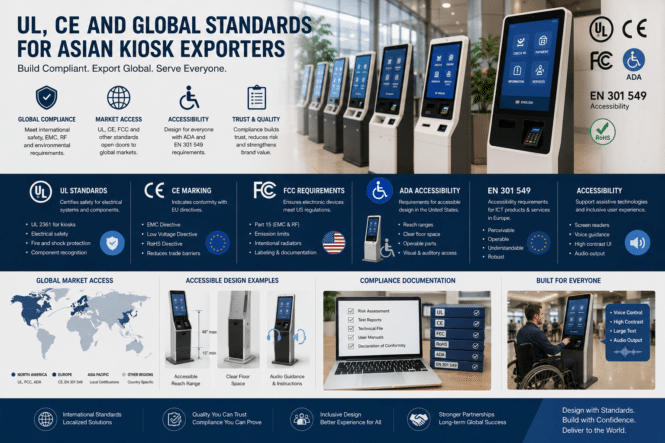
For exporters, understanding the difference between UL standards, CE marking, FCC requirements, ADA accessibility, and EN 301 549 is essential before a kiosk enters an overseas market.
Why Compliance Matters for Kiosk Manufacturers
A kiosk may pass functional testing and still face problems during deployment if its electrical safety, electromagnetic compatibility, wireless functions, or accessibility requirements have not been considered.
For international projects, compliance should therefore be addressed during the engineering stage rather than after the kiosk has already been manufactured.
A typical compliance review may cover:
Electrical safety
EMC and radio emissions
Product labeling
Documentation
Accessibility
User interface design
Assistive technology compatibility
Regional installation requirements
The exact requirements depend on the kiosk’s configuration, intended use, and destination market.
UL Standards for Kiosks in the U.S.
For U.S. deployments, UL standards are an important consideration for kiosk manufacturers and system integrators.
Determine whether a listing or field evaluation by an NRTL is required by the project specification, authority having jurisdiction, insurer, or site operator.
UL maintains a large standards catalog covering different categories of electrical and electronic products.
For example, UL 2361 covers custom-built kiosks including information kiosks, ticket machines, electronic point-of-sale equipment, customer self-checkout stands, and business application products.
Editor Comment – Correct but incomplete. It is an Outline of Investigation, not a conventional consensus UL Standard. It has scope limits, including self-contained products generally operating at 240 V or less; it is generally for indoor use unless outdoor/protected use is specifically investigated.
For manufacturers, this means the compliance discussion should begin with the actual kiosk architecture rather than simply asking whether a factory has a generic “UL certificate.”
Important questions include:
What equipment is inside the kiosk?
What power supply is being used?
Is the kiosk indoor or outdoor?
What voltage and environmental conditions apply?
Which components already have applicable certifications?
What is the final intended use?
A project-specific compliance assessment is therefore more useful than treating UL as a single universal certification.
CE Marking for European Markets
For products entering the European Economic Area, CE marking is another major consideration.
CE marking indicates that the manufacturer has assessed the product against the applicable EU requirements. It does not mean that the European Union has independently approved the product, and not every product requires CE marking.
For kiosk manufacturers, the applicable EU legislation can depend on the product’s design and functions.
A connected kiosk may involve requirements relating to areas such as:
Electromagnetic compatibility
Electrical safety
Radio equipment
RoHS
Machinery, where applicable
The manufacturer must determine which legislation applies to the final product and maintain the appropriate technical documentation and declaration of conformity.
This is especially important for Asian OEM factories producing customized kiosks for different European customers.
FCC Requirements for U.S. Kiosks
Kiosks containing computers, displays, wireless connectivity, or other electronic systems may also need to address FCC requirements.
FCC Part 15 establishes technical requirements for RF devices, including limits for conducted and radiated emissions. Certain intentional radiators, such as wireless transmitters, require FCC certification before they can be marketed in the United States. FCC Part 15 can apply to unintentional radiators and, for wireless features, intentional radiators; the authorization path depends on the device and integration.
This creates an important engineering consideration for kiosk manufacturers.
Changing a wireless module, motherboard, antenna, or power system late in development can affect the compliance configuration.
For this reason, exporters should identify the final hardware configuration before compliance testing rather than treating certification as a final packaging step.
ADA and Kiosk Accessibility
Electrical and electromagnetic compliance are only part of the requirements for an international kiosk.
Accessibility is increasingly important for public-facing self-service systems.
The U.S. 2010 ADA Standards for Accessible Design establish minimum requirements for accessibility in covered public facilities, commercial facilities, and other environments.
For kiosk projects, accessibility can influence the physical and user-interface design.
Manufacturers and integrators may need to consider:
Accessible operating height
Reach ranges
Clear floor space
Controls and input methods
Audio output
Visual information
Tactile features
Alternative interaction methods
The key point is that accessibility should be considered as part of the overall kiosk design rather than added after the enclosure has been finalized.
EN 301 549 and Assistive Technology
For European ICT products, EN 301 549 is particularly relevant to accessibility. EN 301 549 is a technical accessibility standard, not automatically a universal legal obligation for every commercial kiosk. Its legal relevance depends on the procurement or regulatory route—including the European Accessibility Act for in-scope products and services. The big reference to 301 is EAA.
The standard addresses accessibility requirements for ICT products and services, including requirements related to closed functionality and interaction with assistive technologies. For example, where closed ICT functionality prevents users from installing assistive technology, the standard includes requirements for accessible operation without requiring the user to attach or install such technology.
This has direct relevance to self-service terminals.
A kiosk may need to provide alternative ways to access information, instructions, transaction prompts, confirmation messages, and other functions.
Audio output can also become important. EN 301 549 includes requirements around non-visual access and speech output for certain closed functionality.
For European projects, accessibility should therefore be considered at both the hardware and software level.
Accessibility Is More Than Physical Design
One common mistake is to treat accessibility as simply lowering a touchscreen.
In reality, an accessible kiosk involves the complete interaction chain:
For example, a kiosk with an accessible screen height may still create barriers if important information is available only visually.
Similarly, a voice-enabled interface may improve accessibility, but the system still needs to provide reliable alternatives for users who cannot or do not want to use voice interaction.
The goal is not simply to meet a checklist. It is to create a self-service system that can be operated by the widest practical range of users.
What Asian Kiosk Exporters Should Prepare
Before exporting a kiosk, manufacturers should create a compliance checklist based on the target market.
For the United States
Review:
UL requirements applicable to the kiosk
FCC requirements
ADA accessibility
Electrical safety
Wireless equipment requirements
For Europe
Review:
Applicable CE legislation
EMC requirements
Radio requirements where applicable
RoHS
EN 301 549 and accessibility requirements
Local deployment requirements
The exact combination depends on the final product configuration, so manufacturers should avoid assuming that one certificate automatically covers an entire kiosk system.
Global
UK: UKCA/CE transition status, UK Radio Equipment Regulations, EMC Regulations, electrical-equipment safety rules, and UK RoHS.
Canada: CSA/ULC or another recognized certification route, provincial electrical inspection requirements, and ISED requirements for wireless/radio equipment.
Australia and New Zealand: RCM, electrical-safety approvals, EMC requirements, and ACMA supplier-registration obligations.
Japan, South Korea, Singapore, Gulf states, and India: Applicable electrical-safety, radio, conformity-marking, import, and local-language regimes vary significantly. Avoid a “global” claim without discussing them.
We should also cover critical kiosk-specific requirements that are not primarily UL/CE/FCC:
Payments: PCI PTS for PIN-entry devices, PCI DSS responsibilities in the payment environment, EMVCo approval, and acquirer/payment-network requirements. A kiosk enclosure may be properly safety listed but still fail a payment deployment.
Outdoor installation: IEC 60529/IP rating, IK impact rating, UV/temperature design, corrosion, condensation, ingress paths around printers and payment hardware, anchoring, wind loads, and local electrical-installation rules.
Cybersecurity and privacy: Secure boot, signed software updates, patchability, network segmentation, remote-management security, data retention, camera/microphone disclosure, and biometric/identity data handling.
Evidence package: Exporters need a bill of materials under configuration control, test reports, critical-component list, wiring diagrams, risk assessment, EU Declaration of Conformity, marking artwork, instructions in required languages, and change-control procedures.
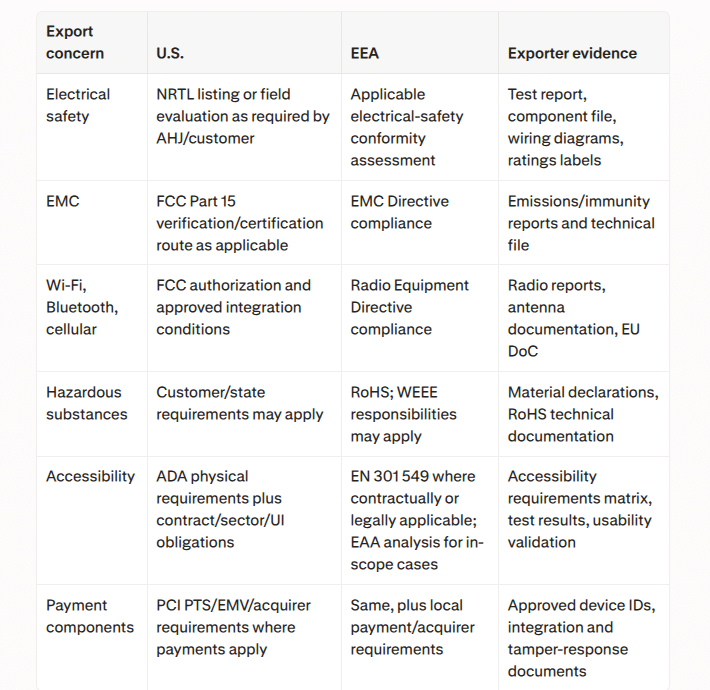
Considerations Table
Compliance Should Start at the Design Stage
For OEM and ODM manufacturers, the most efficient approach is to integrate compliance into product development.
Engineering teams should define the target markets before selecting:
Power supplies
Computing platforms
Wireless modules
Displays
Touch controllers
Payment hardware
Audio systems
This reduces the risk of redesigning the kiosk after testing.
It also makes it easier for international customers to evaluate the product during the RFP and procurement process.
Building Export-Ready Kiosks
For Asian kiosk manufacturers, international competitiveness increasingly depends on more than manufacturing cost.
This is particularly important for large deployments where hundreds or thousands of kiosks may be installed across multiple locations.
A manufacturer that can provide engineering documentation, testing records, component information, accessibility considerations, and lifecycle support can offer considerably more value than a factory that only provides finished hardware.
Conclusion
Global kiosk compliance is becoming a core part of international product development.
UL standards, CE marking, FCC requirements, ADA accessibility, and EN 301 549 address different aspects of deploying technology in international markets. They should therefore be evaluated according to the kiosk’s configuration, application, and destination rather than treated as interchangeable certifications.
For Asian kiosk exporters, the strongest strategy is to consider compliance and accessibility from the beginning of the engineering process. Doing so can reduce redesign costs, simplify international deployment, and make customized kiosk platforms more competitive in global markets.
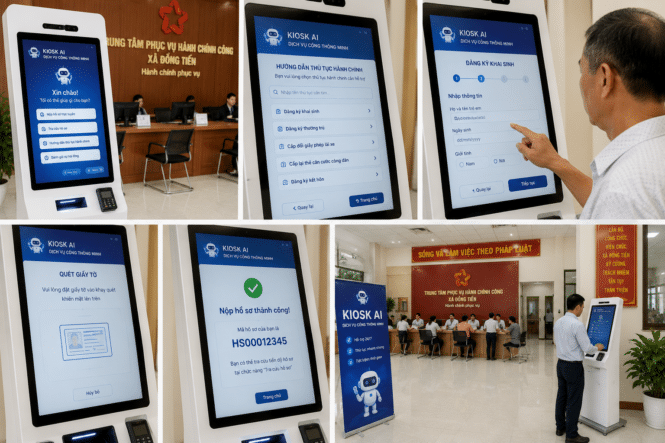
Artificial intelligence is reshaping public services, and Vietnam is embracing the trend with the deployment of AI kiosks for government administration.
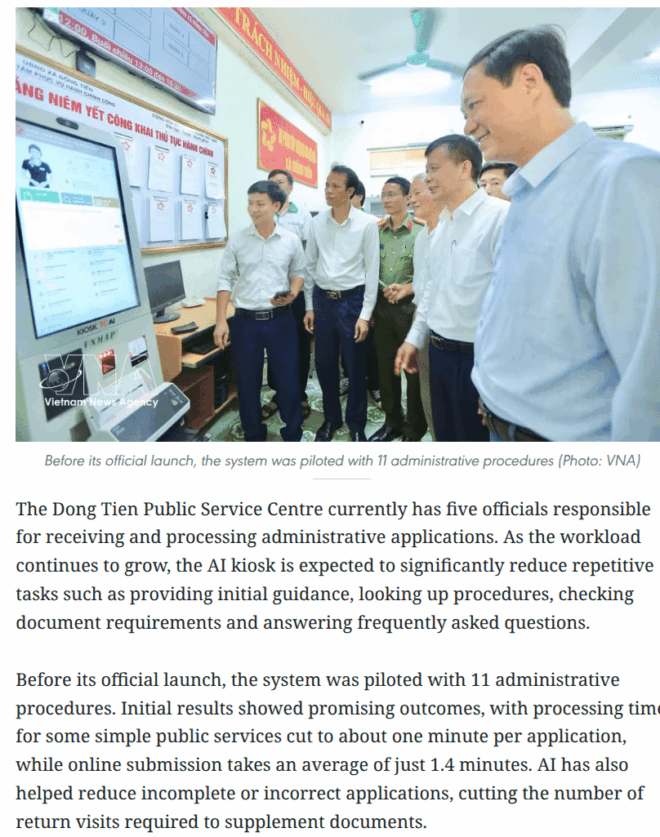
Dong Tien’s deployment is more than an information or queue-ticket kiosk: it is a guided digital-intake channel linked to VNeID and Vietnam’s national public-service platform. In the initial pilot of 11 procedures, simple applications were reported to take about one minute, while online submission averaged 1.4 minutes. However, the kiosk should be viewed as an intake and assistance layer—not an autonomous replacement for civil servants—because officials remain responsible for reviewing applications and handling exceptions.
From Information Kiosks to AI Kiosks
Traditional self-service kiosks mainly provide basic functions such as information lookup and queue management. The new generation of AI kiosks goes much further by helping citizens complete administrative tasks through intelligent interaction.
The system integrates several advanced technologies, including:
Artificial Intelligence (AI)
Voice Recognition
Natural Language Processing (NLP)
Optical Character Recognition (OCR)
Digital identity verification
Instead of searching through multiple government websites, users can simply describe the service they need, and the kiosk guides them through the entire process.
Faster and Smarter Public Services
The AI kiosk is designed to reduce waiting times while improving service efficiency.
Citizens can receive guidance for services such as:
Birth registration
Residence registration
Driver’s license renewal
Online document submission
According to the pilot program, some applications can now be completed in about one minute, while online submissions take just over a minute. The intelligent system also helps reduce incomplete applications by automatically checking required documents.
Why AI Kiosks Matter
Governments worldwide are investing in smart kiosks to improve digital public services.
Compared with traditional service counters, AI-powered kiosks offer several advantages:
24/7 self-service access
Faster processing
Reduced workload for government staff
Improved user experience
Greater digital accessibility
These benefits make AI kiosks an important part of smart city and digital government initiatives.
The Future of Self-Service Government
Vietnam’s latest deployment reflects a growing trend toward AI-powered public administration.
As technologies such as AI, OCR, NLP, and digital identity platforms continue to evolve, public service kiosks are expected to become more intelligent, enabling governments to deliver faster, more efficient, and more accessible services.
For kiosk manufacturers and solution providers, the public sector is becoming an increasingly important market as governments accelerate digital transformation across administrative services.
Conclusion
The introduction of AI kiosks in Vietnam demonstrates how self-service technology is moving beyond retail into public administration.
By combining artificial intelligence with digital government platforms, AI kiosks are helping create faster, smarter, and more citizen-friendly public services while supporting the broader development of smart cities.
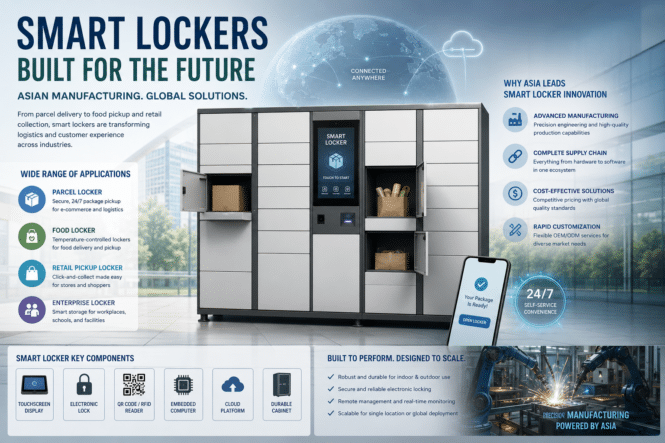
The rapid growth of e-commerce, food delivery, and smart retail has increased demand for automated storage solutions. Smart lockers and parcel lockers are becoming an essential part of modern logistics, allowing customers to collect packages, food orders, and products without waiting for staff assistance.
Asia has become one of the world’s leading regions for smart locker manufacturing, supported by strong hardware production capabilities, advanced supply chains, and large-scale adoption of self-service technology.
What Are Smart Lockers?
A smart locker is an electronic storage system that allows users to securely store and retrieve items through digital authentication.
Unlike traditional lockers, smart lockers use technologies such as:
Touchscreens
QR code scanning
RFID identification
Mobile applications
Cloud management platforms
Electronic locking systems
These features enable automated access and remote management, making smart lockers suitable for many commercial applications.
Parcel Lockers for Modern Logistics
The growth of online shopping has created a major demand for parcel lockers.
Instead of requiring customers to wait for delivery drivers, parcel lockers provide a convenient pickup point where users can collect packages at any time.
Common locations include:
Residential communities
Office buildings
Shopping centers
Transportation stations
Universities
Parcel lockers help logistics companies reduce delivery costs while improving customer convenience.
Smart Lockers Beyond Package Delivery
Although parcel delivery is one of the largest applications, smart locker technology is expanding into many industries.
Food Lockers
Food lockers are becoming popular for restaurants, supermarkets, and delivery services.
Customers can collect prepared meals from temperature-controlled lockers, reducing waiting times and improving delivery efficiency.
Retail Pickup Lockers
Retailers use pickup lockers to support click-and-collect services.
Customers can order online and retrieve products from automated lockers without visiting a checkout counter.
Workplace and Enterprise Lockers
Companies use electronic lockers for:
Employee storage
Equipment management
Document collection
Secure deliveries
Why Asia Leads Smart Locker Manufacturing
Asia has become a major hub for smart locker production due to several advantages.
Strong Hardware Manufacturing
Countries such as China, Taiwan, South Korea, and Japan have mature manufacturing ecosystems for:
Metal fabrication
Electronic components
Touch displays
Embedded computers
IoT systems
Complete Supply Chains
Smart lockers combine mechanical structures, electronics, software, and cloud platforms. Asian manufacturers can integrate these components efficiently through established supply networks.
Large Market Adoption
High-density cities and rapid e-commerce growth have accelerated smart locker deployment across Asia.
From apartment communities to convenience stores, smart lockers are becoming part of everyday urban infrastructure.
Key Components of a Smart Locker System
A commercial smart locker usually includes:
Locker cabinet structure
Electronic locks
Touchscreen interface
Embedded computer
Barcode or QR scanner
Network connectivity
Management software
For large-scale deployments, manufacturers must focus on reliability, security, and easy maintenance.
Choosing a Smart Locker Manufacturer
When selecting a supplier, businesses should consider:
Hardware Quality
The locker should support long-term outdoor or indoor operation with durable materials and reliable electronic components.
Software Integration
Modern smart lockers require integration with logistics platforms, mobile apps, and cloud management systems.
Customization Capability
Different industries require different designs, including:
Parcel lockers
Food lockers
Refrigerated lockers
Outdoor lockers
Retail pickup stations
OEM and ODM capabilities are important for companies developing customized solutions.
The Future of Smart Lockers
As automation continues to transform logistics and retail, smart lockers will play a growing role in self-service infrastructure.
Future systems will combine:
Artificial intelligence
Computer vision
IoT connectivity
Automated inventory management
These technologies will make lockers smarter, more secure, and easier to manage.
Conclusion
Smart lockers, parcel lockers, and electronic lockers are becoming essential solutions for modern delivery and self-service applications.
With strong manufacturing capabilities, advanced supply chains, and extensive real-world deployment experience, Asia continues to lead the global smart locker industry.
For businesses entering automated logistics, retail pickup, or food delivery markets, choosing the right manufacturing partner will be critical for building reliable and scalable locker solutions.
From Vietnam Plus — While traditional electronic kiosks mainly provide information lookup or queue-number services, the new AI kiosk applied by Dong Tien commune in Thanh Hoa province incorporates technologies such as AI, a conversational virtual assistant, voice recognition, natural language processing (NLP), optical character recognition (OCR), and connectivity with the VNeID digital identity platform and the national online public service system.
Summary
The Dong Tien commune in Thanh Hoa Province, Vietnam has deployed what appears to be one of the first comprehensive AI-powered government service kiosks designed to assist citizens throughout nearly the entire administrative process.
Unlike traditional government kiosks that only:
Display information
Print queue tickets
Provide simple lookups
this kiosk functions as an AI public service assistant.
What makes it different
The system combines several technologies into one workflow:
Conversational AI virtual assistant
Voice recognition
Natural Language Processing (NLP)
OCR document scanning
Integration with Vietnam’s VNeID digital identity
Connection to the national online public service platform
Residents simply tell the kiosk what they want:
“I need to register a birth.”
or
“I need to renew my driver’s license.”
The kiosk then:
Understands the request
Identifies the proper government procedure
Lists required documents
Helps complete forms
Digitizes paperwork
Uploads applications online
Lets citizens track application status
The user never needs to know which department or form is required.
Real-world results
During pilot testing:
Processing time for simple transactions dropped to about one minute
Average online submission took 1.4 minutes
Incorrect and incomplete applications were reduced significantly
Citizens made fewer repeat visits because paperwork was completed correctly the first time
Accessibility
One feature I particularly like is that the designers thought about usability:
Voice interaction
Adjustable speech speed
Adjustable volume
Step-by-step visual guidance
Better support for elderly users and people with limited digital skills
That is much closer to universal design than many government kiosks currently deployed.
Operational benefit
The public service center only has five staff members processing applications.
The kiosk now handles repetitive work such as:
answering FAQs
explaining procedures
checking required documents
guiding citizens through forms
allowing staff to focus on approvals and exceptions rather than basic assistance.
Why this is important
This is the first public-service kiosk I’ve seen that really demonstrates the value of Generative AI at the edge.
Most “AI kiosks” announced over the last two years have really been:
chatbots on a touchscreen
queue management
informational search
marketing demonstrations
This system is different because it actually completes work.
It changes the interaction from:
Citizen → Government Website → Confusion
to
Citizen → AI Conversation → Completed Government Transaction
That is a fundamental shift.
For the kiosk industry, this points toward what I think will become the next generation of government self-service:
AI-guided form completion
Digital identity integration
OCR and automatic document verification
Conversational interfaces instead of menu trees
End-to-end transaction completion rather than information lookup
Those capabilities are likely to become the benchmark for future municipal, state, and national government kiosks.
I think this would make an excellent feature article for Kiosk Industry under a title such as:
Vietnam May Have Built the First Truly Useful AI Government Kiosk
It highlights an application where AI isn’t just a novelty—it materially improves the citizen experience while reducing workload for government staff.
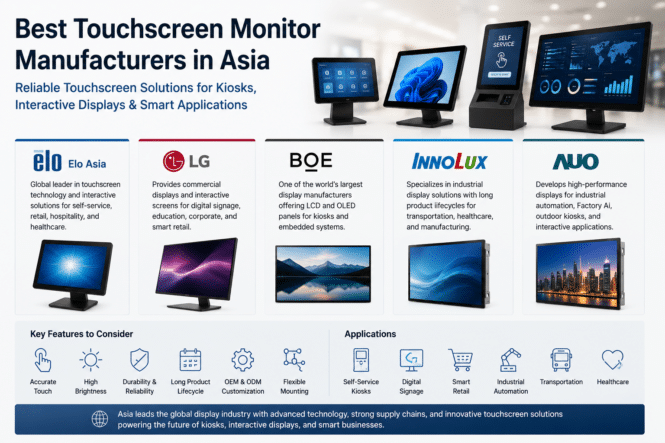
As self-service kiosks, digital signage, and smart retail continue to expand, the demand for reliable touchscreen monitors is growing rapidly. Businesses today require commercial displays that offer accurate touch performance, long product lifecycles, and stable operation in public environments.
Asia has become the global center for touchscreen manufacturing, supported by advanced display technology, strong OEM and ODM capabilities, and efficient supply chains.
Leading Touchscreen Monitor Manufacturers
Several Asian companies are driving innovation in commercial touch screen monitors and interactive screens.
Elo Asia is well known for touchscreen solutions used in self-service kiosks, retail, hospitality, and healthcare.
LG provides commercial interactive displays for digital signage, education, and smart retail applications.
BOE is one of the world’s largest display manufacturers, supplying LCD and OLED panels for kiosks and embedded systems.
Innolux specializes in industrial display solutions with long product lifecycles for transportation, healthcare, and manufacturing.
AUO develops high-performance display technologies for industrial automation, Factory AI, and outdoor interactive applications.
Choosing the Right Touchscreen Monitor
When selecting a commercial touchscreen monitor, businesses should consider:
Touch accuracy
Display brightness
Screen durability
Industrial reliability
Long-term product availability
OEM and ODM customization
These features help ensure reliable operation in self-service kiosks, digital signage, and other commercial environments.
Why Asia Leads the Industry
Asia continues to dominate the global display market through strong manufacturing capabilities, advanced panel technology, and integrated supply chains. Manufacturers across China, Taiwan, and South Korea supply touchscreen solutions used in retail, transportation, healthcare, and industrial automation worldwide.
Conclusion
As demand for touchscreen monitors, touch screen monitors, and interactive screens continues to increase, Asian manufacturers remain at the forefront of innovation. Companies including Elo Asia, LG, BOE, Innolux, and AUO provide reliable commercial display solutions that support the next generation of kiosks, digital signage, and smart retail technologies.
Alibaba’s “New Retail” Continues to Influence Asia’s Supermarkets
While many Western retailers are still balancing e-commerce with physical stores, China has spent years refining a different model. Alibaba calls it “New Retail”—the seamless integration of digital commerce, physical shopping, fulfillment, payments, and AI into a single customer experience.
The best-known example is Freshippo (Hema), Alibaba’s chain of technology-enabled supermarkets. Stores operate simultaneously as neighborhood grocery stores, micro-fulfillment centers, restaurants, and last-mile delivery hubs. Employees pick online orders directly from store shelves, placing purchases onto overhead conveyor systems that route orders to packing stations for rapid local delivery. Many locations promise delivery within 30 minutes for customers living nearby.
Technology is embedded throughout the shopping journey. Customers use mobile apps to scan products for sourcing information, receive personalized recommendations, pay digitally, and schedule home delivery. Digital shelf labels, AI-driven merchandising, blockchain-enabled product traceability, robotic assistance, and automated fulfillment all contribute to a highly connected retail environment.
For the self-service industry, Alibaba’s approach demonstrates that kiosks are only one component of a much broader ecosystem. Mobile ordering, digital signage, AI recommendations, computer vision, smart logistics, and real-time inventory management work together to create a unified retail experience where online and in-store shopping become virtually indistinguishable.
Although Alibaba has since shifted some of its corporate strategy and reduced emphasis on owning physical retail assets, the concepts pioneered through New Retail continue to influence retailers across Asia and beyond. Technologies first deployed in Freshippo—including micro-fulfillment, omnichannel operations, intelligent automation, and data-driven merchandising—have become reference points for supermarket modernization worldwide.
For kiosk manufacturers, digital signage providers, and retail technology companies serving Asia, the lesson remains clear: the supermarket of the future is not simply more automated—it is built around an integrated platform where self-service, AI, logistics, and digital commerce operate as one connected system.
Artificial intelligence is rapidly moving from the cloud to the edge. Instead of processing data remotely, businesses are deploying edge computing to run AI directly inside kiosks, digital signage, and smart retail systems.
Asia has become the global leader in this transformation thanks to its strong semiconductor industry, embedded computing ecosystem, and OEM/ODM manufacturing capabilities.
Why Edge Computing Matters
For self-service applications, speed and reliability are essential. An edge computer processes data locally, reducing latency while improving security and minimizing cloud dependency.
Key benefits include:
Faster AI processing
Lower latency
Better data privacy
Reduced bandwidth costs
Reliable offline operation
These advantages make edge computing ideal for kiosks, vending machines, digital signage, and smart retail.
AI Computers Enable Smarter Self-Service
Today’s AI computers combine CPUs with dedicated AI acceleration, allowing real-time computer vision, voice recognition, and customer analytics without relying on cloud servers.
Common applications include:
Self-checkout
Digital signage
Interactive kiosks
Smart vending
Queue management
Technologies Driving Edge AI
Several hardware platforms are shaping the future of embedded AI:
Intel Core Ultra – Built-in NPUs deliver efficient AI processing for compact edge devices.
AMD Ryzen Embedded – Industrial-grade processors designed for long lifecycle and reliable 24/7 operation.
Hailo – Dedicated AI accelerators optimized for computer vision and low-power inference.
NVIDIA Jetson – High-performance Edge AI platform for robotics, Factory AI, and advanced computer vision.
Why Asia Leads Embedded AI
Asia dominates the embedded AI market because of four key advantages:
Strong semiconductor manufacturing
Mature OEM and ODM supply chains
Leading embedded computer manufacturers
Rapid adoption of smart retail and Factory AI
This combination enables faster product development and lower production costs for global technology providers.
Looking Ahead
As AI continues moving toward the edge, demand for edge computers and AI computers will continue to grow.
For kiosk manufacturers, digital signage providers, and system integrators, choosing the right embedded AI platform will be essential for delivering faster, smarter, and more reliable self-service solutions.
Conclusion
Edge computing is becoming the foundation of modern self-service technology. With platforms like Intel Core Ultra, AMD Ryzen Embedded, Hailo, and NVIDIA Jetson, Asia is leading the next generation of embedded AI, powering smarter kiosks, digital signage, and Factory AI across industries.
As AI, edge computing, and self-service technologies continue to reshape retail and public spaces, choosing the right mini PC has become critical for kiosk manufacturers, digital signage providers, and system integrators.
Modern kiosks require compact hardware that delivers reliable performance, low power consumption, multiple display outputs, and long-term availability. Asian manufacturers have become global leaders by combining industrial-grade reliability with competitive pricing and strong OEM/ODM capabilities.
Here are some of the top Asian mini PC manufacturers worth considering in 2026.
1. Giada
Giada is one of the best-known manufacturers of industrial mini PCs for digital signage and kiosk applications.
Its systems are widely used in retail stores, transportation hubs, healthcare facilities, and interactive kiosks. Many models support dual or quad displays, fanless operation, and 24/7 continuous use.
Best for:
Digital signage
Retail kiosks
Interactive displays
2. ASUS IoT
ASUS IoT combines enterprise reliability with the engineering expertise of ASUS.
Its compact AI computers and industrial mini PCs support Intel processors, Edge AI workloads, and remote device management, making them suitable for smart retail and intelligent automation.
Best for:
Smart retail
AI edge computing
Enterprise deployments
3. Advantech
Advantech remains one of Asia’s largest industrial computing companies.
Its embedded computers support a wide range of Edge AI applications, including computer vision, industrial automation, and self-service kiosks. Long product lifecycles also make Advantech attractive for enterprise deployments.
Best for:
Industrial automation
Smart factories
Edge AI
4. AAEON
AAEON specializes in embedded computing and AI-powered edge devices.
Its mini PCs often feature Intel Core processors with integrated AI acceleration, making them suitable for machine vision, autonomous systems, and intelligent kiosks.
Best for:
AI computing
Embedded systems
Smart cities
5. IEI Integration Corp.
IEI offers industrial-grade mini PCs designed for demanding environments.
Its products support multiple I/O interfaces, wide operating temperatures, and flexible expansion options, making them popular among kiosk manufacturers and system integrators.
Best for:
Self-service kiosks
Transportation
Industrial control
Why Mini PCs Are Replacing Traditional Desktop Systems
Modern mini PCs deliver significantly more computing power while occupying a much smaller footprint than traditional desktop computers.
For kiosk and digital signage deployments, they offer several advantages:
Compact size for space-constrained installations
Low power consumption
Silent fanless operation
Multiple display support
Industrial reliability
Long product availability
As Edge AI becomes more common, many manufacturers now integrate NPUs and AI acceleration into their latest AI computers, enabling computer vision, customer analytics, and voice interaction directly at the edge.
Choosing the Right Mini PC for Your Project
Before selecting a platform, system integrators should consider several factors:
CPU and AI acceleration capabilities
Multi-display support
Operating temperature range
Industrial I/O options
Remote management
Long-term product availability
OEM and ODM customization
For digital signage and kiosk deployments, long lifecycle support is often more valuable than having the newest processor.
Final Thoughts
Asia continues to lead the global market for industrial mini PCs, embedded computers, and Edge AI hardware. Companies such as Giada, ASUS IoT, Advantech, AAEON, and IEI provide reliable platforms that power everything from digital signage and self-service kiosks to smart retail and industrial automation.
As AI computing continues to move toward the edge, selecting the right hardware partner will become just as important as choosing the right software platform.